

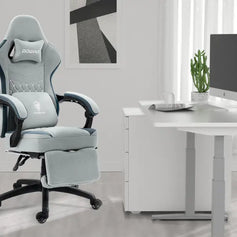


A gaming room is more than a place to set up a computer, monitors, and a console. A well-designed gaming space should balance visual style, everyday comfort, practical storage, and the right atmosphere while still reflecting the personality of the person using it.
When decorating a gaming room, there is no need to rely entirely on dramatic lighting, bright colors, or an exaggerated cyberpunk aesthetic. Rather than filling the room with as many gaming elements as possible, focus on creating a consistent visual theme and choosing furniture, lighting, and decorations that suit the way you use the space.
This guide covers color coordination, furniture selection, collectible displays, wall décor, lighting, cable management, and other practical details to help you create a gaming room that is both comfortable and visually appealing.
1. Choose a Style for Your Gaming Room
Before buying furniture and decorations, decide what kind of atmosphere you want the room to have. Adding items without a clear direction can quickly make the space feel cluttered, especially when colors, materials, and decorative styles begin to compete with one another.
Popular gaming room styles include:
- Modern minimalist
- Black-and-white tech-inspired
- Dark cyberpunk
- Japanese-inspired natural wood
- Game-themed
- Collectible display room
For a clean and timeless look, use black, white, and gray as the primary colors. To create a warmer atmosphere, introduce natural wood, beige, or light gray furniture. For a stronger gaming identity, start with a neutral foundation and add blue, purple, red, or another accent color through lighting, posters, and smaller decorative items.
Once you have chosen a style, the desk, chair, shelving, lighting, and wall décor should follow the same visual direction. This helps the room remain cohesive even when it contains a large number of devices, collectibles, and accessories.
2. Create a Cohesive Gaming Room Color Scheme
Keep It Clean with a Monochromatic Palette
A monochromatic color scheme works well for anyone who wants a clean, minimalist gaming room. For example, a black desk, black chair, and dark gray shelving unit against light gray or white walls can create a polished, modern look.
Using a limited color palette does not mean every item must look identical. Different materials and finishes can add depth without disrupting the overall design. Consider combinations such as:
- A black metal desk frame with a dark wood-grain desktop
- Matte black shelving with glass cabinet doors
- A dark gray fabric chair with black armrests
- White walls with a light gray area rug
When the colors remain consistent, variations in texture and material can make the room feel more layered and refined.
Add Depth with Contrasting Colors
Contrasting colors are a good choice for smaller gaming rooms that need stronger visual definition.
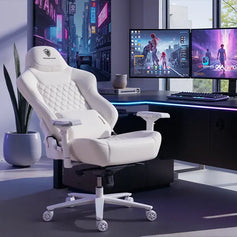
A white desk paired with a black chair, or light-colored walls combined with dark shelving, can create a clear sense of depth. In a darker room, a light gray, off-white, or brightly colored chair can also serve as the main visual focal point.
However, contrast should be used selectively. If the desk, chair, cabinets, walls, and decorations all use unrelated colors, the room may lose its sense of structure. In most cases, one primary contrasting combination is enough.
Use Bold Accent Colors for More Personality
Bold color combinations can make a gaming room feel more energetic and distinctive. Popular options include:
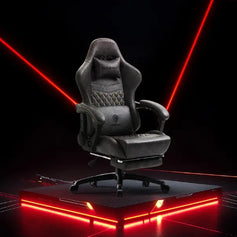
- Black and red
- Dark gray and neon green
- White and blue
- Purple and pink
The key is not to use as many colors as possible, but to control how much of each color appears in the room. Let black, white, gray, or natural wood cover most of the space, then introduce one brighter accent color.
The accent color might appear on the chair, cushions, neon sign, desk mat, wall art, or collectible figures. There is usually no need to paint an entire wall or choose every piece of furniture in a highly saturated color. Limited accents are easier to coordinate and more likely to remain appealing over time.
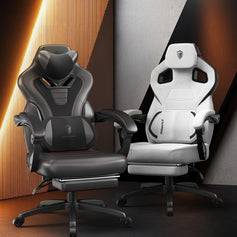
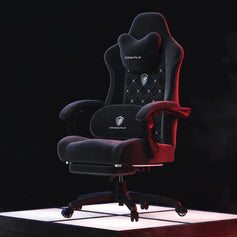
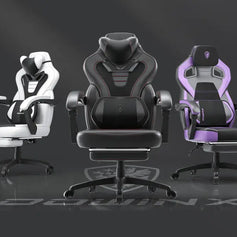
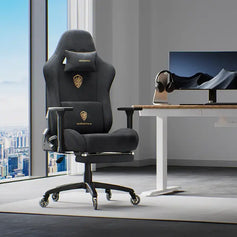
3. Choose a Gaming Chair for Comfort, Not Just Style
The chair is one of the most frequently used pieces of furniture in a gaming room, so comfort and support should take priority over appearance.
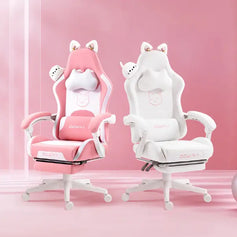
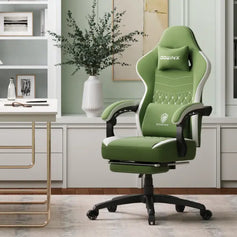
A brightly colored gaming chair with an aggressive design may not suit every user or every interior. There is no need to limit your options to traditional racing-style chairs. Ergonomic office chairs, wide-seat desk chairs, upholstered chairs, and reclining chairs with footrests can all work well in a gaming setup.
When choosing a chair, consider the following:
- Whether the seat dimensions suit your body type
- Whether the lumbar area receives stable support
- Whether the backrest angle is easy to adjust
- Whether the armrest height aligns comfortably with the desk
- Whether the upholstery is breathable and easy to clean
- Whether the seat remains comfortable during long sessions
- Whether the overall size of the chair suits the room
If the room is also used for work, studying, video editing, or streaming, a chair designed for extended use becomes even more important. A comfortable chair with a simple color scheme will often fit into a wider range of interiors than a heavily styled gaming chair, while also being more practical in the long term.
4. Use Shelving to Display Collectibles and Personal Items
Shelving provides valuable storage while also giving the gaming room a stronger sense of identity.
You can use it to display game characters, models, limited-edition merchandise, trading cards, consoles, comic books, trophies, and other meaningful items. Instead of crowding every collectible into one area, leave enough empty space for each piece to be seen clearly.
Here are several effective ways to organize a display shelf.
Organize Collectibles by Theme
Place items from the same game, anime, franchise, or collection together. For example, one shelf might feature merchandise from a particular game series, while another displays consoles or retro gaming items.
Coordinate Displays by Color
If you have a large collection, organizing items by color can help the display coordinate with the room’s overall palette. This creates visual consistency even when the objects come from different franchises or product categories.
Use Different Heights to Create Visual Depth
Small display risers, clear acrylic stands, or storage boxes of different heights can prevent items in the back from being hidden. Place larger models near the visual center and distribute smaller items around them to create a more balanced arrangement.
There is no need to fill every shelf completely. Leaving some open space reduces visual pressure and gives you room to expand the collection later.
5. Build the Gaming Atmosphere with Signs and Ambient Lighting
Lighting plays an important role in defining the atmosphere of a gaming room. Decorative signs can feature game icons, pixel art, usernames, logos, short phrases, or simple geometric designs. Positioning one above the desk, beside a shelving unit, or on an otherwise empty wall can create an immediate focal point.
Other lighting options include:
- Monitor backlights
- LED strips around or beneath the desk
- Shelf lighting
- Ambient floor lamps
- Corner lamps
- Smart light bulbs
- Motion-activated cabinet lights
It is usually best to limit the lighting scheme to one or two primary colors. Too many colors displayed at the same time can make the room feel chaotic and may become uncomfortable during longer gaming or working sessions.
For example, a black or gray room works well with blue or purple lighting. A white room can be paired with pale blue, soft pink, or warm white. Rooms with natural wood furniture often look better with warm white or amber lighting.
Ambient lighting should not completely replace functional room lighting. The space still needs a soft, evenly distributed main light or task light to prevent excessive contrast between the screen and the surrounding environment, which may contribute to eye strain.
6. Turn an Empty Wall into a Gaming Feature Wall
If the desk area is complete but the room still feels unfinished, the empty wall space may be the reason.
Suitable wall decorations for a gaming room include:
- Game posters
- Metal wall art
- Pixel-style decorations
- Pegboards
- Corkboards for photos and notes
- Replica props or display weapons
- Game maps or concept art
Wall decorations do not need to cover every surface. Instead, create one main feature area around the desk or shelving unit and keep the remaining walls relatively simple.
7. Add Comfort with Rugs, Curtains, and Soft Furnishings
Many gaming rooms focus heavily on the desk and lighting while overlooking the floor, windows, and other soft furnishings. These elements can make a significant difference to how complete and comfortable the room feels.
An area rug can define the desk and chair zone while reducing the sound created by chair casters moving across a hard floor. Avoid rugs with excessively long fibers, as they may make it difficult to move the chair.
Curtains help control natural light and reduce glare on the monitor. Dark blackout curtains are suitable for a more immersive environment, while light gray or beige curtains can make the room feel softer and more open.
Cushions, blankets, seat pads, or a compact sofa can also create a secondary relaxation area. A gaming room does not have to be designed exclusively for sitting at a desk. It can also include space for reading, watching movies, or using a handheld console.
8. Keep Your Gaming Setup Clean with Cable Management
Even a carefully coordinated room can look unfinished if cables are hanging beneath the desk or spread across the floor.
Use under-desk cable trays, reusable hook-and-loop ties, cable management boxes, desk-leg cable sleeves, and wall-mounted cable covers to organize power cords and data cables. Whenever possible, secure the power strip beneath the desktop to reduce the number of visible cables on the floor.
Before positioning the desk, consider where the power outlets are located and how many devices need to be connected. Leave enough capacity for future additions such as lamps, speakers, consoles, chargers, or streaming equipment.
Cable management is not only about appearance. It can also reduce tripping hazards, dust buildup, loose connections, and unnecessary wear on cables and plugs.
9. Improve Sound Quality with Simple Acoustic Treatments
If you regularly stream, use voice chat, play games at higher volumes, or share walls with a bedroom or living area, it may be worth improving the room’s acoustic performance.
Thick curtains, rugs, upholstered chairs, sofas, and padded materials can help reduce sound reflections inside the room. Acoustic wall panels can also become part of the design, especially when arranged in different shapes or complementary colors.
However, standard acoustic materials mainly reduce echo within the room. They do not fully prevent sound from traveling into neighboring spaces. More effective soundproofing may require attention to door gaps, wall construction, windows, and other structural areas.
10. Avoid Overdecorating Your Gaming Room
One of the most common problems with gaming rooms is the gradual accumulation of lights, posters, collectibles, and accessories until the space loses its sense of order.
A well-balanced gaming room should follow three basic principles: keep major furniture visually consistent, give each area a clear purpose, and leave enough empty space between decorative elements.
The desktop should remain focused on equipment and everyday use rather than being crowded with figures and decorations. Shelving should hold most collectibles, the walls should establish the visual theme, and empty corners can be finished with a plant, floor lamp, or small side cabinet.
When every item has a clear place, the room becomes easier to maintain, clean, and update over time.
Final Thoughts: Build a Gaming Room That Works for You
The purpose of decorating a gaming room is not simply to create a display space filled with lights and gaming merchandise. It is to build an environment that reflects your interests while remaining comfortable and practical for extended use.
Start by using the desk, chair, and shelving to establish the overall visual foundation. Then introduce personality through collectibles, lighting, wall art, and soft furnishings. Choose a chair based on comfort and support rather than limiting yourself to traditional gaming designs, and use bold colors and lighting in moderation to prevent the room from becoming visually overwhelming.
An ideal gaming room can support gaming, work, studying, streaming, and relaxation while still expressing personal style. With a consistent color palette, a clear layout, and organized storage, even a room without major renovations can gradually become a comfortable and distinctive gaming space.